 ControlSignage
Create content in-house.
Start with a template, build an editable design and keep your visual identity consistent with reusable brand kits.
FEATURES THAT WORK TOGETHER
Create, organize, schedule and monitor. Explore the tools behind a screen network that is easier to run—and easier to keep up to date.
LESS BUSYWORK. MORE POSSIBILITIES.
Build the message. Find the audience.
Let your screens do the talking.
Start with a template, build an editable design and keep your visual identity consistent with reusable brand kits.
Schedule start and end times, set recurring displays and prepare content ahead of the moment it matters.
Organize sites, sub-sites and areas. Target screens by name, tags or condition-based Smart Groups.
Bring creatives and destinations together, preview affected screens and match landscape or portrait content.
Check current online/offline status, follow publication delivery and review alerts for technical issues.
With Pro, explore player-reported Proof of Play, downloadable playback records and historical screen uptime trends.
INCLUDED WITH PRO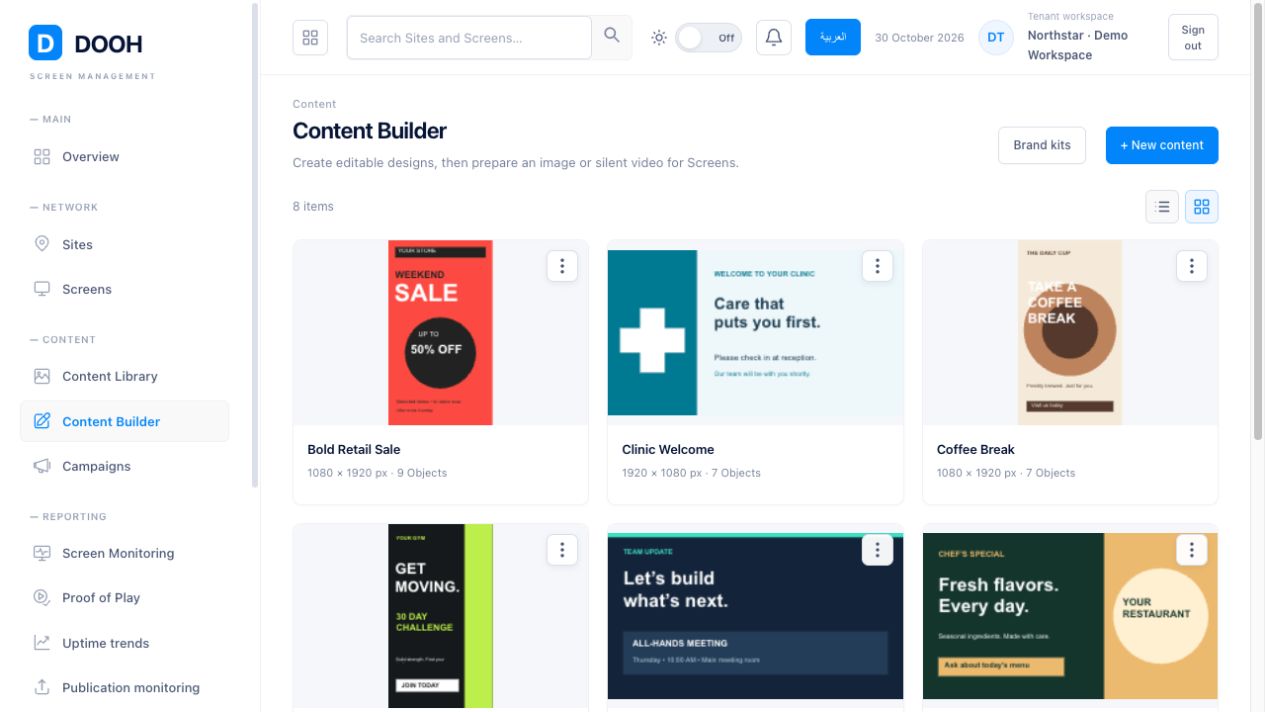
MEET CONTENT BUILDER
New menu? Seasonal collection? A team update? Create your next display without leaving your signage workspace.
YOUR CONTENT, IN GOOD ORDER
Keep images, videos and rendered designs in one place. Browse thumbnails, search by name and use folders without losing the bigger picture of all your content.
THE RIGHT MESSAGE. THE RIGHT MOMENT.
Plan a single display, a recurring message or a campaign that reaches a changing set of locations.
Arrange content on site, sub-site or screen pages. Set date and time windows or recurring days. Orientation matching keeps portrait and landscape content with the right screens.
Choose sites, sub-sites, screen names, tags, areas or Smart Groups. Review affected screens and add separate optional landscape and portrait creative selections.
Combine multiple conditions with AND or OR. Use location information, tags, custom fields, screen names, dimensions, orientation and areas to define the group.
Playlist additions use independent content copies. Updating a source design does not silently replace a live creative: render and assign new content when you want a new version.
VISIBILITY THAT FITS YOUR PLAN
Plus includes current online/offline screen status. Pro adds the longer view, with player-reported Proof of Play, downloadable playback records and historical uptime trends.
YOUR NEXT GREAT DISPLAY STARTS HERE
One month. Three devices. All the possibilities.
Start your free month No card needed. No automatic charges.